Export Orders from the Last X Days
Use this option when you want each export run to use a rolling time window instead of the last successful export date.
You can export orders created or modified within the last X days, where X is set by the user.
This extends the existing delta export functionality.
To export orders created or modified in the last X days:
-
Open an Export Profile.
-
Set Entity → Orders.
-
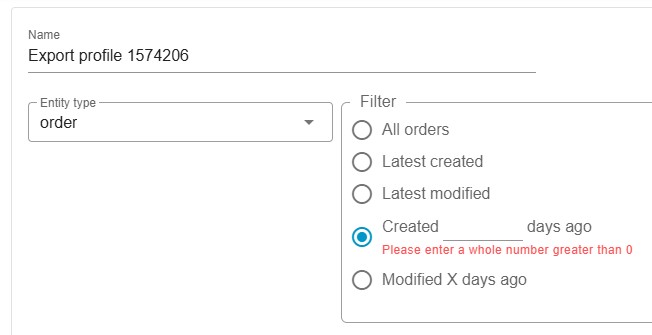
In the Filter section, select:
-
Created X days ago exports orders created in the last X days.
-
Modified X days ago exports orders modified in the last X days.
The X placeholder becomes a small numeric input field.
-
-
Enter an integer value greater than 0.
-
Configure the remaining settings, save the profile, and run the export.
Filtering Behavior
Section titled “Filtering Behavior”If X is provided:
- The app ignores the previous export run date.
- The filter is calculated as:
current profile run datetime - X days - A new relative time window is calculated for each run.
Validation and Fallback Logic
Section titled “Validation and Fallback Logic”- The input accepts whole numbers greater than 0.
- If the selected X-days option has no valid value:
- A validation message is shown.
- The system falls back to existing behavior:
- Latest created
- Latest modified
Restriction
Section titled “Restriction”The X-days options follow the same delta export restriction as existing latest-created/latest-modified filters (orders_delta_export feature).
Example
Section titled “Example”- Today: Feb 17, 15:00
- X = 7
- Filter: Modified X days ago
Export includes orders updated after Feb 10, 15:00.