Export Orders
Use this page when you need to export orders together with their line items.
Order exports can also include customer business data in the mapping:
| Field | Mapping key | Notes |
|---|---|---|
| Customer account type | orderCustomer.customer.accountType | Exports private or business when available on the related customer account. |
| Customer company | orderCustomer.company | Exports the company saved on the order customer record. |
| Customer VAT IDs | orderCustomer.vatIds | Exports all VAT IDs in one value, separated by the profile’s multiple-value separator. |
Each order export can contain multiple rows for the same order:
- Row with
linetype = orderrepresents the order data. - Rows with
linetype = lineItemsrepresent the order items.
Export only line items
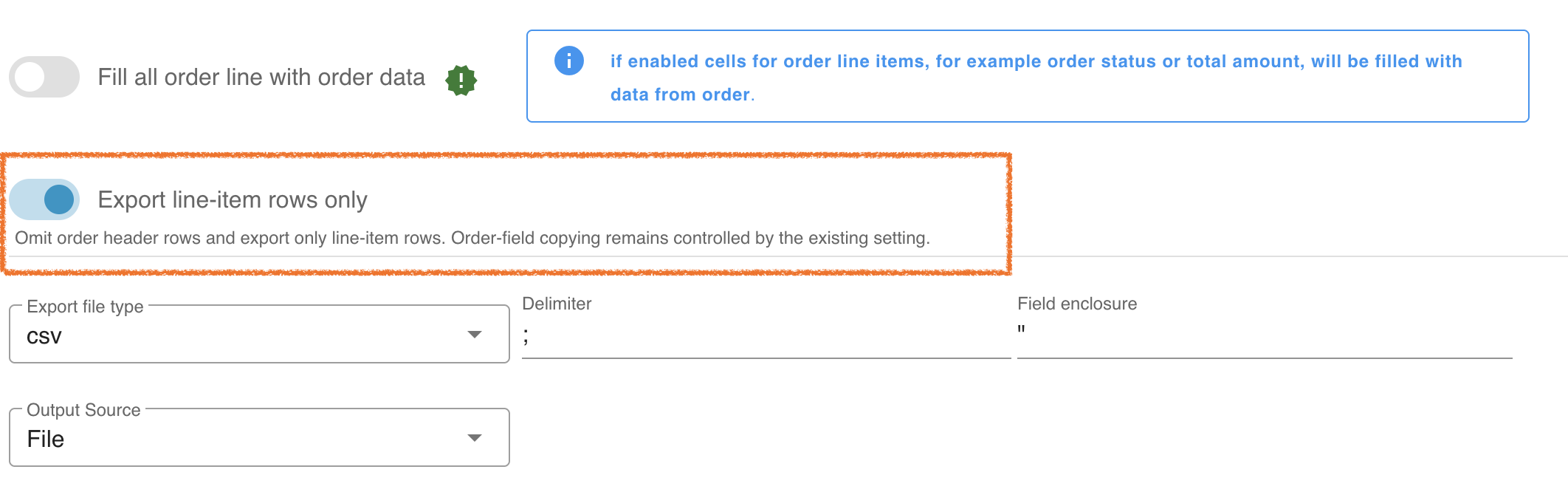
Section titled “Export only line items”For CSV, XLSX, or Google Sheets, enable Export line-item rows only on the first page of the export profile. This omits the order rows and keeps the lineItems rows. Enable Fill all order line with order data as well if your ERP needs order details on each item row.
Order data on line-item rows
Section titled “Order data on line-item rows”By default, line item rows do not contain order-related data in the order columns:
| linetype | orderNumber | orderStatus | paymentStatus | amountTotal | Subtotal | Total excluding VAT |
|---|---|---|---|---|---|---|
| order | 10002 | open | open | 122.4 | 110.4 | 102.85 |
| lineItems | 10002 | |||||
| lineItems | 10003 |
To fill line item rows with order data, enable Fill all order line with order data in the export profile settings.

When this option is enabled, all rows include data from their related order.
| linetype | orderNumber | orderStatus | paymentStatus | amountTotal | Subtotal | Total excluding VAT |
|---|---|---|---|---|---|---|
| order | 10002 | open | open | 122.4 | 110.4 | 102.85 |
| lineItems | 10002 | open | open | 122.4 | 110.4 | 102.85 |
| lineItems | 10003 | open | open | 122.4 | 110.4 | 102.85 |
PHP script errors
Section titled “PHP script errors”For CSV, XLSX, and Google Sheets, the PHP modification script runs on each output row before it is written. If the script raises an error, that row is omitted and the export continues. The export can finish successfully even when rows are missing. Download the export log to find the error message and script line number. For item-only calculations, check that $row['linetype'] === 'lineItems' so empty item fields on order rows do not cause errors.